
Download CaRMetal – geometry tool, dynamic geometry, math software, geometric drawing, interactive math
Overview
CaRMetal is a mobile adaptation of the C.a.R. (Compass and Ruler) program, crafted to support dynamic geometric construction on smartphones and tablets. Designed with educational and mathematical precision in mind, the app enables users to create accurate geometric figures with intuitive touch-based controls. Its primary purpose is to simplify the process of geometric drawing, removing redundant steps and streamlining workflows to enhance focus and creativity. The app serves as a powerful tool for students, educators, and math enthusiasts who require a reliable platform for constructing and analyzing geometric shapes.
By integrating dynamic geometry principles, CaRMetal allows users to build figures that respond to real-time adjustments—ideal for exploring geometric theorems, transformations, and spatial relationships. The app is particularly useful in classroom settings, where teachers can demonstrate geometric concepts interactively, and students can experiment with constructions independently. It also supports complex mathematical calculations, making it suitable for advanced problem-solving and project-based learning.
Developed by Jean-Marc Nicod, CaRMetal reflects a commitment to accessible, high-quality educational software. The app’s focus on clarity and functionality aligns with modern pedagogical approaches that emphasize visual and hands-on learning. Its ability to export projects in multiple formats further strengthens its role in academic and professional environments, where sharing and documentation are essential. Despite the lack of detailed technical specifications, the app’s core functionality remains robust and purpose-built for its intended audience.
Key Features & Functionality
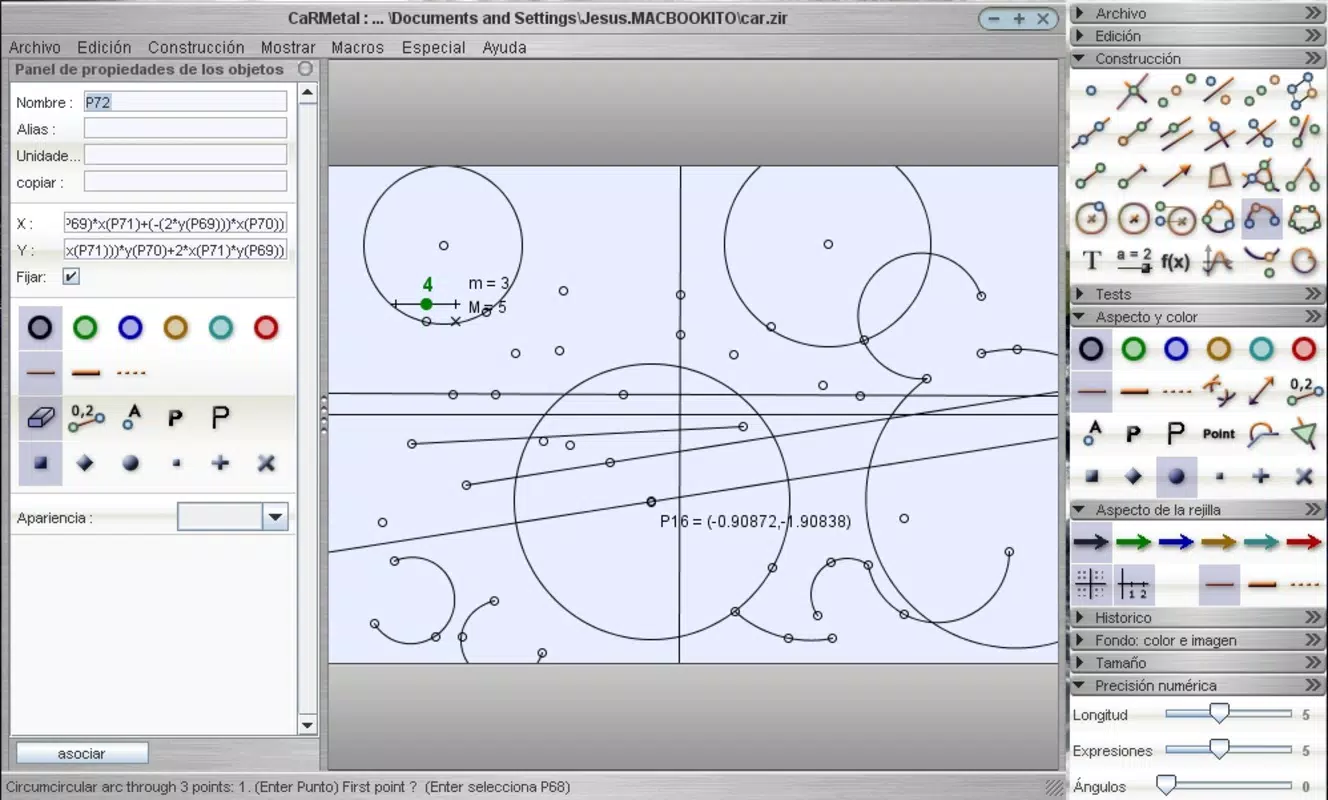
- Intuitive Drawing Interface: The app provides a responsive touch interface that enables users to place points, draw lines, and construct shapes with minimal effort. A real-time preview of lines and shapes based on selected tools enhances accuracy and reduces errors during construction.
- Comprehensive Toolset: A diverse array of geometric tools is available directly on the toolbar, including tools for constructing parallels, perpendiculars, angles, polygons, and segments. These tools are optimized for mobile use, ensuring precision even on smaller screens.
- Advanced Mathematical Capabilities: Users can perform complex mathematical operations and analyze functions directly within their geometric projects. This feature supports deeper exploration of mathematical relationships and is especially beneficial for algebraic-geometric integration.
- Text and Annotations: The ability to add labels and explanatory text directly onto figures improves clarity and educational value. This functionality is ideal for creating annotated diagrams for lessons, presentations, or study materials.
- Multiple Export Formats: Projects can be exported in EPS, SVG, and PNG formats, enabling seamless integration with other software, printing, or sharing across platforms. This versatility supports both digital and print-based workflows.
For example, a high school geometry teacher might use CaRMetal to demonstrate the properties of a triangle’s centroid, adjusting the shape dynamically while observing changes in real time. A university student could apply the app to verify geometric theorems through interactive construction. The combination of visual feedback and computational support makes the app a valuable asset in both formal and informal learning environments.
Interface, UX & Performance
The user interface of CaRMetal is clean and purpose-driven, designed to minimize visual clutter and maximize usability. The layout prioritizes tool accessibility, with the primary drawing functions arranged in a logically grouped toolbar. Navigation is straightforward, relying on intuitive touch gestures such as tapping, dragging, and long-pressing to access context-sensitive options.
Visual style emphasizes clarity and precision, with smooth lines and consistent color coding for different geometric elements. The app maintains responsiveness across various device categories, delivering a stable experience even when handling complex constructions. Although the developer did not list formal performance metrics, the app operates without noticeable lag during standard use cases.
Stability appears to be well-maintained, with no reported issues related to crashes or freezes. The app efficiently manages memory usage, which is critical for maintaining performance on lower-end devices. Users can expect consistent behavior when switching between tools or exporting projects. Overall, the UX is optimized for educational use, where reliability and ease of use are paramount.
Platform Compatibility & Technical Requirements
CaRMetal is available exclusively on the Android platform. The current version is 2.0.0, with a file size of 48.2 MB. The app is offered free of charge, making it accessible to a broad audience, including schools and individual learners.
The developer did not specify minimum OS requirements or compatibility details beyond the platform. Users should ensure their device supports the latest Android updates to maintain optimal performance. While no specific hardware requirements were listed, the app’s moderate size suggests it is designed to run efficiently on a wide range of Android devices, from mid-tier smartphones to tablets.
Pros and Cons
- Free to download and use
- Intuitive touch-based interface for geometric construction
- Supports dynamic geometry and real-time adjustments
- Multiple export formats for cross-platform sharing
- Integrated mathematical calculations for deeper analysis
- No official information on minimum OS version or device compatibility
- Limited to Android platform only
- Developer did not provide detailed performance benchmarks
- Minimal user feedback or community resources available
- No in-app purchases or subscription model, but limited monetization options
FAQ
Is CaRMetal safe to download and install?
Yes, the app is available through official Android channels and is free from known malware. It does not require excessive permissions, minimizing security risks.
Can I use CaRMetal on iOS devices?
Currently, CaRMetal is only available on Android. There is no official iOS version released as of the latest update.
Does CaRMetal require an internet connection?
No, the app functions fully offline. All geometric constructions and calculations are processed locally on the device.
How often are updates released for CaRMetal?
Update frequency is not publicly disclosed. The last release was on September 11, 2020, but the app remains functional and accessible.
Can I export my projects to PDF?
While CaRMetal supports export to EPS, SVG, and PNG formats, there is no built-in option to export directly to PDF. Users may convert the exported files using third-party tools.
Final Thoughts
CaRMetal stands out as a specialized yet powerful tool for anyone engaged in geometric learning or teaching. Its focus on dynamic geometry, combined with a streamlined interface and robust export options, makes it a valuable addition to the educational app ecosystem. The app excels in delivering precision and interactivity without compromising usability, even on mobile devices.
While its platform exclusivity to Android and lack of detailed technical documentation are limitations, the app’s core strengths—accuracy, educational value, and free access—outweigh these constraints. It is particularly well-suited for math teachers, students, and self-learners who need a reliable, mobile-friendly geometry tool.
Download CaRMetal now


